
The real terminal
for the AI Native era.
Run every AI agent in one window, see what each is doing, and share context between them.
- 09:41:02claude · refactor auth middleware4m 12s
- 09:38:57codex · write tests for session store2m 41s
- 09:31:14amp · tidy the settings page58s
Works with the agents you already have installed
See it run, in under a minute
A short tour: several agents in one window, each saying what it is doing, and what happens when one of them needs you.
A terminal made for running agents
Knows your agents
It can tell whether an agent is working, finished, or waiting for you.
Runs them side by side
Workspaces, tabs and split panes, so several agents fit in one window.
Manages sessions
Resume old sessions, move them between Claude Code and Codex, or link them up.
Shows what's going on
Processes, usage, git and subagents each get their own screen.
Small and quick
Under a 20MB download, written in Rust and drawn on the GPU. It opens right away.
Reaches your phone
Open your workspaces in a browser on another device, over your own Tailscale network.
It knows what your agents are doing
Agentty notices when an agent finishes, asks for permission or waits for you, and tells you with a border, a badge and a notification.
- Working, done, waiting and permission states per agent
- The highlight stays until you look
- Notifications show the reply’s first line
- Model, context, usage limit and branch on every pane
macOS only Clicking a notification to jump to its pane is macOS only for now.
- workingClaude Codeapi · refactor
- workingCodexapi · tests
- waitingGemini CLIdocs
- doneAntigravityweb · ui
Run as many agents as you want in one window
No limit on panes or agents. Opus on the main task, Codex on tests, Gemini on docs — and each session can get its own worktree, so none of them touch the same files.
Share context between agents
Agentty reads the session history Claude Code and Codex keep, so you can search, resume, hand over and link sessions.
Your terminals, on any device
Open them in a browser, wherever you are and whatever you are holding, and pick the work up where you left it.
- Every workspace, tab and split pane, each with the state it is in
- Type into the terminal, or answer a question with one tap
- Browser notifications when a session finishes or asks you something
- Slack, Discord and Telegram notices can link to that exact terminal
- Speak a prompt instead of typing it, transcribed on your own machine by a model you install once
Reachable through Tailscale, and only for the account that owns the Mac — not by IP, not from the same Wi‑Fi. Agentty refuses to run if Funnel is on for its port.
Kept as a hash in the system Keychain. Five wrong tries lock the page, doubling up to an hour, and the sign‑in is an HttpOnly cookie with cross‑site requests refused.
Disconnect, sign out or quit Tailscale and the page goes down within seconds. It comes back when you reconnect.
From an idea to a live URL
Describe the app you want. Agentty sets up the project and you watch the agent build it in the in‑app browser. When it is done, Launch puts it on the web.
Describe an app or drop in a spec or files, and Claude Code or Codex builds it with a live preview.
Creates a GitHub repo and a Vercel deployment and hands you a public URL. If a step fails, the error goes to the agent to fix.
- Project created · habit-streaks
- Claude Code is building…
- Live preview · localhost:3000
- GitHub repository
- Vercel production deploy
- Supabase migrations
Every agent you run, behind one button
One plugin, one agent. Install or build agents that run x.com, Instagram or customer support, and start them with one click from a panel beside your terminals.
The app shows what a plugin needs before you install it, and plugins never receive your passwords or cookies.
A plugin lists its jobs in a panel beside your terminals. Press one and an agent starts; each automation gets its own tab with a line saying what it is doing, and several run side by side.
On sites you approve, a plugin can read pages, click, type, fill forms and upload files. Sign in once and Agentty keeps you signed in. macOS only.
Get one from the Marketplace, a folder or Git, or write one with the Node SDK. Each plugin shows its permissions before you install, and a prompt for your terminals asks you first.
A plugin can offer Claude Code and Codex tools of its own, through an MCP server Agentty registers for you. Agents see them while the plugin is enabled and its MCP connection is allowed, and not otherwise.
Built the way a Forward Deployed Engineer works
A Forward Deployed Engineer goes on site and builds the agent that site needs. Agentty is heading the same way: agents shaped by plugins for each situation, all run in one Agentty.

Put each site’s jobs, panel and models into a plugin.
Every agent runs with the same status, permissions and approvals.
Take an agent that worked to the next site as a plugin, and adapt it.
Everything has a screen you can look at
You shouldn't need ps aux | grep claude to find out what your agents are up to. These pages are part of the app.
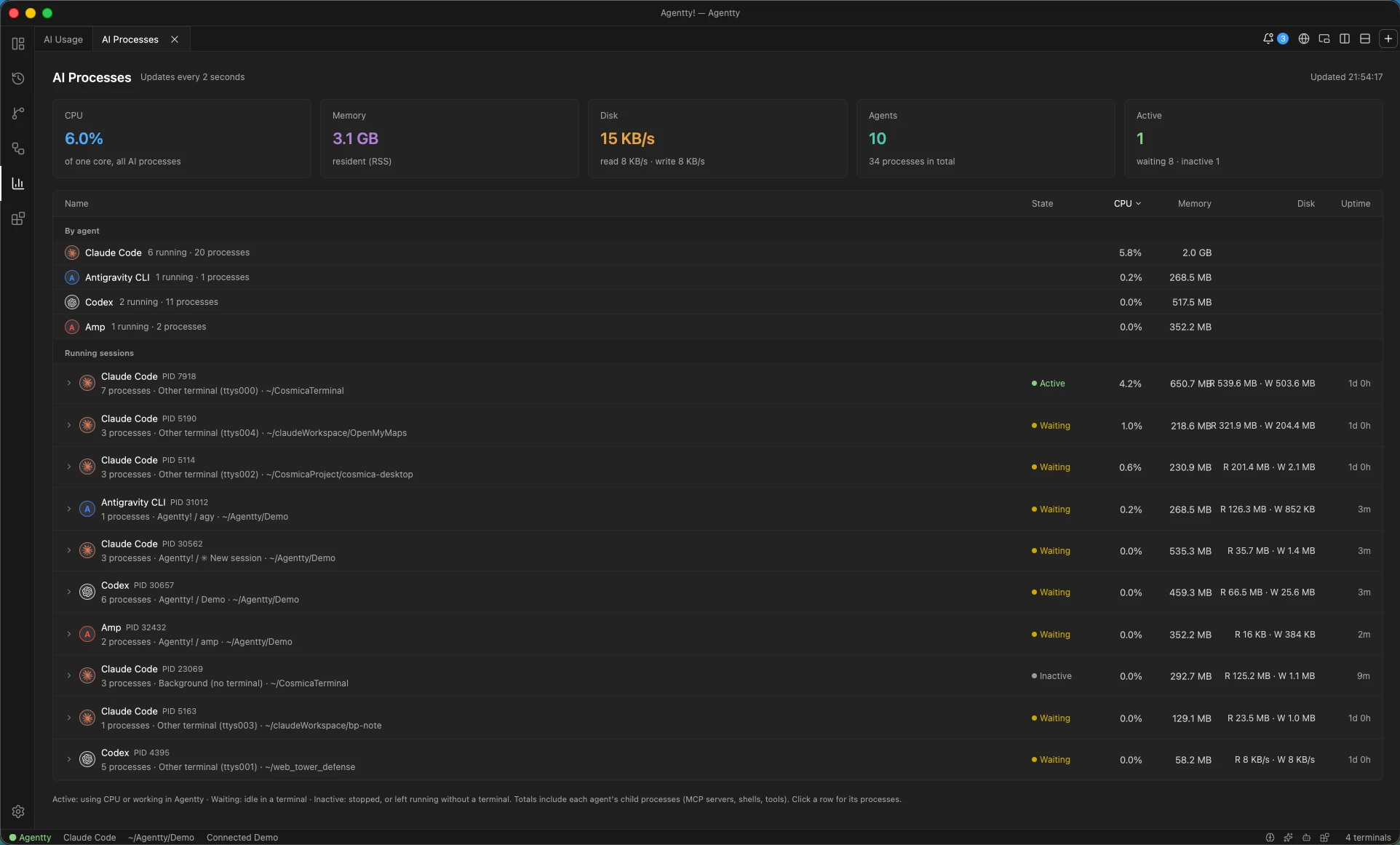
CPU, memory and disk per agent, including MCP servers and child processes, refreshed every 2 seconds.
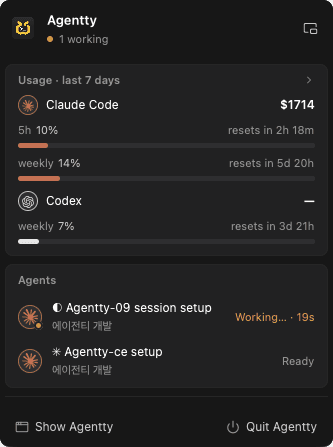
Weekly usage, time until limits reset, and the list of running agents.
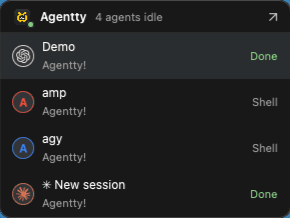
Shrinks the window into a small panel that stays on top. When an agent finishes, a speech bubble pops up.
Usage, processes, proxy, worktrees and disk in one place. Cost, tokens and cache hits come from local logs, and stale worktrees and build caches are cleaned up safely.
Diff, commit, switch branches and merge inside the app. The branch chip’s colour shows uncommitted or unpushed work.
See the network connections tabs and AI sessions make. HTTPS stays encrypted, and the log lives only in memory.
Keep your dev server beside the terminal. Claude Code and Codex click, type and screenshot in a browser of each terminal’s own, never in each other’s page.
Skills, subagents, commands, plugins and MCP servers in one list. Official MCP servers can be added with one click.
Under 20MB to download, and it opens right away
No Electron. Written in Rust and drawn by the GPU, so the CPU and memory stay with your agents.
Download size · macOS
Agentty beside the tools it is usually compared with
Four terminals for running coding agents, and the honest version of where each one stops. A dash means the project does not document that feature — including two rows where the dash is ours.
Checked on 3 October 2026 against each project's own README and site: tmux, cmux (Ghostty‑based, macOS only, by manaflow‑ai) and Orca (MIT, ~84k stars, by stablyai). A dash means the project does not document the feature, not that it cannot do it. tmux is a terminal multiplexer rather than an agent runner, and runs on Windows only through WSL or Cygwin. Tell us if any of this has changed and we will correct it.
Everything Agentty does, on one page
Build my idea
Describe an app, paste a plan or drop files, and an agent builds it with a live preview.
Launch
A GitHub repo, a Vercel production deploy and a public URL, with Supabase when you need it.
Agent status
Working, done, waiting or needs permission, with highlighted panes and notifications.
Unlimited splits
As many workspaces, tabs, panes and windows as you need. Agents open in a new tab or a split.
A working tree per session
A new AI session in a busy project gets a fresh git worktree and branch, or joins an existing one — your choice.
Multi‑model communication
Link Claude Code and Codex sessions so context flows live, one way or both.
Session manager
Search, resume and move sessions between Claude Code and Codex.
Chat workspaces
Talk to one lead agent. It plans the work and starts workers, each with its own terminal and its own git worktree — four at a time, reviewers included.
Remote access
Your workspaces in a browser on another device, over your own Tailscale network — watch, type and send prompts.
Voice prompts
On the remote page, tap the microphone and speak. The clip is transcribed by a local model on the machine running Agentty, and no audio leaves it.
In‑app browser
See results instantly while agents click, type and test — each terminal in a browser of its own.
AgentGit
Built‑in Git for the repo of the session you're looking at. ⌘‑click the branch chip to open it on your Git host.
AI process monitor
CPU, memory and disk for every agent, MCP server and child process.
AI usage dashboard
Cost, tokens, cache hits, models and tools from local transcripts.
Proxy
The network connections a tab or AI session makes. HTTPS stays encrypted, records stay in memory.
Subagent view
Which subagents are running, which model they use and what they did last.
Extensions & MCP
Skills, subagents, plugins and MCP servers managed in one place. Plugins come from the Marketplace, a folder or Git.
Tools from a plugin
A plugin can give Claude Code and Codex tools of its own over MCP, once you allow the connection on its Permissions tab.
Browser automations
A plugin can drive the in‑app browser on sites you approve — signed in, and out of sight unless you want to watch. macOS only.
A workspace per plugin
One tab per automation, each with its own panel, browser page and terminals, running side by side.
API connectors
Expose any HTTP API to your agents as an MCP tool.
Mini mode & menu bar
Keep an eye on every agent without keeping the window open.
Worktree & disk cleanup
Remove old git worktrees and clear build output and caches that rebuild themselves. Dependencies are never touched.
Your conversations stay on your computer
Session lists and usage come from files on your machine, and Agentty never sends your conversations anywhere. The source is Apache 2.0.
- Conversations stay local
- Secrets in Keychain
- Owner‑only file access
- Apache 2.0 licensed
Free. The whole thing.
No account, no subscription, no seats, no paid tier. Every release is the same build for everyone.
- Every feature on this page, on macOS, Windows and Linux
- Unlimited workspaces, tabs, panes and agents
- Plugins from the Marketplace, a folder or your own Git
- Updates for as long as there are releases
- The source itself — read it, fork it, build it
You pay your AI provider directly, the way you already do. Agentty never sits between the agent CLIs and their providers, and takes no cut of what you spend there.
Frequently asked questions
What is Agentty?
Agentty is a native terminal app for running AI coding agents such as Claude Code, Codex, Gemini CLI, Amp and OpenCode. It shows what each agent is doing, runs as many agents as you want in split panes, and lets sessions share context with each other.
Which AI agents does Agentty work with?
Claude Code and Codex have the deepest integration, including live status, session management and context sharing. Gemini CLI, Antigravity CLI, Amp, OpenCode, Copilot CLI, Cursor Agent, Qwen Code, Droid, Goose, Crush, Aider and local Ollama models are detected and can be launched from the app.
How is Agentty different from tmux?
tmux splits a terminal into panes but doesn't know what runs inside them. Agentty also gives you unlimited splits, and on top of that it knows when an agent is working or waiting for you, manages Claude Code and Codex sessions, passes context between them, and includes an in‑app browser, Git and usage views.
How is Agentty different from cmux?
Both are native terminals for AI coding agents with split panes, attention notifications and an in‑app browser, but cmux is macOS‑only while Agentty also runs on Windows and Linux. cmux is built on Ghostty and focuses on vertical tabs and a scriptable CLI and socket API. Agentty goes further into the sessions themselves: it links Claude Code and Codex sessions so context flows between them live or both ways, lets you search, resume and move sessions between the two, and adds an AI process monitor, a usage dashboard, a built‑in Git page and MCP server management.
Is Agentty free?
Yes, Agentty is free to download. The source code is public under the Apache License 2.0.
Does Agentty upload my conversations?
No. Session lists, usage numbers and handoffs are built from files on your computer.
Can Agentty build and deploy an app for me?
Yes. Build my idea takes a description, a plan or files, creates a project and starts Claude Code or Codex to build it with a live preview in the in‑app browser. The built‑in Launch plugin then creates a GitHub repository and a Vercel production deploy with a public URL, and can connect Supabase.
Can a plugin use the browser and my sign‑ins?
On macOS, yes, on the sites it declares and you approve. It can open pages there — out of sight unless you want to watch — and read them, click, type, fill forms and upload files. You sign in once in the page yourself; Agentty then keeps that site's session cookies in the Keychain and keeps them fresh, so an automation does not begin by signing in again, and on macOS 14 or later it can keep several accounts of the same site apart. The plugin itself never receives your passwords or cookies. It types only into terminals it opened — into yours only right after you use it — and never answers a question or an approval for you. An agent it starts on text read from the web can be run files‑only, with no shell, web or browser tools, so instructions hidden in a page have nothing to reach. Windows and Linux have no in‑app browser yet, so these calls are unavailable there.
Which platforms does Agentty support?
macOS 13 or later on Apple silicon, Windows 10 version 1809 or later on x64, and Linux on x86_64 as a .deb (Debian 12+, Ubuntu 22.04+) or an .rpm (RHEL 9+, Fedora). Intel Macs are not supported. The in‑app browser, the browser tools agents and plugins drive, remote access, the menu bar item, mini mode and click‑to‑focus notifications are macOS‑only for now; everything else works on all three.
Why does Windows warn me when I install Agentty?
The Windows installer is not code‑signed yet, so SmartScreen may say the publisher is unknown. Choose More info → Run anyway. It installs for your user only and needs no administrator rights. If your browser refuses to download the .exe at all — Chrome blocks unsigned executables — take the .zip instead; it holds the same installer.
Does Agentty update itself?
On macOS and Windows, yes: it downloads the new version, verifies its checksum, installs it and starts again. On Linux it tells you a new version is out and links to the release page — you install the .deb or .rpm with your package manager.
Claude Code is installed, but Agentty will not start it
Run Help → Diagnose problems, which is also in Settings → System check. It looks for what usually causes this: a CLI a new terminal cannot find because PATH was never set up, several copies of one CLI installed at once, a Claude Code or Codex settings file with a syntax error, variables in your shell startup files that confuse Claude Code, and terminal integration files that are missing or out of date. Every finding has its own Fix button, with Fix all beside them, and a file a fix changes is copied next to the original first. When several copies of a CLI are installed, Agentty starts the newest one.
Claude Code’s screen looks wrong — the input box is not at the bottom
Its fullscreen screen has turned itself off, which happens after earlier launches ended early. Help → Diagnose problems finds that and puts it back.
Can I use Agentty from my phone?
Remote access puts your workspaces in a browser on another device — a phone, a tablet or another computer — over your own Tailscale network: every workspace, tab and split pane with its status, the terminal live, typing into it, quick buttons to answer an agent, a prompt box, and browser notifications when a session finishes or asks something. It is never on the public internet: only your own tailnet reaches it, only the Tailscale account that owns the Mac is let in, and then a web password you set yourself. It is macOS‑only for now, and it arrived in v0.2.11. Since v0.2.14 you can also speak a prompt instead of typing it: tap the microphone and the clip is transcribed on your own machine by a local model you install once from Settings → Remote access, so no audio is sent anywhere. A chat workspace opens on the page as its chat, too.
Can several agents work on one task together?
Yes — that is what a chat workspace is for. You talk to one lead agent in a chat, and it plans the work and starts workers, each with its own terminal and its own git worktree on a branch of its own: four at a time, reviewers included. A reviewer reads a worker’s changes before the lead merges them, and the chat itself runs on a branch of the project (agentty/chat-…), so your working folder is left alone until you ask for the result — the lead then opens a pull request or merges. The chat’s bar shows how much of your plan the team is using and warns you before the limit stops everyone midway. It works from the remote page as well.

Smarter AI development
starts here.
Free to download, and open source under the Apache License 2.0.